ArtBot
Arduino Firmware
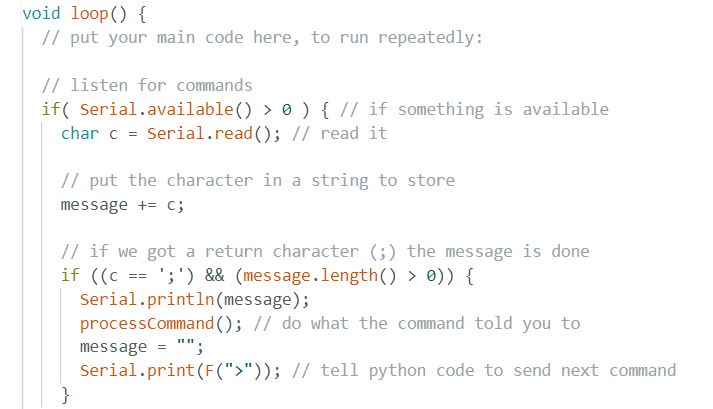
The Arduino Uno receives generated G-code commands from the Python script through a serial connection with the python package pyserial. The commands are sent one character at a time and stored in a string. Once the Arduino detects that it has received the end of the message, it parses through the message to separate all the commands it contains, and then acts on those commands.This is what a few lines of G-Code look like:
- Z0;
- G3;
- G1 X100 Y50 Z1;
- G0 X400 Y250;
How does the Arduino interpret these commands?
- G1 and G0 - These commands tell the Arduino that it needs to move in a straight line to the coordinates that follow it in the message.
- X and Y - The numbers after X and Y are the coordinates that the marker needs to move to. The motors always move the carriage in a straight line using Bresenham's line algorithm. For curves, ArtBot simply separates the curve into many small segments.
- Z - The Z command controls the height of the pen. Z0 lifts both markers, Z1 lowers the left marker, and Z2 lowers the right marker.
- G3 - This command “homes” the marker. This means that it resets the marker to the position (0,0) by moving it in the x-direction until it hits a limit switch on the end of the x-axis, and then moving it in the y-direction until it hits a limit switch at the end of the y-axis. The pen will end up in the top rightmost corner of the paper. This command allows us to keep track of the current position of the markers and to scale drawings to fit in the drawing area.
- ; - A semi-colon tells the Arduino that the message is over. This is very important because the Arduino can only store up to 64 bytes of information in its serial buffer, so if does not clear the string that contains the previous message after every time it processes the commands it would run out of space very quickly and would not be able to receive or process any new messages.
After the Arduino has processed the message and ran all the corresponding commands, it notifies the Python script that it is ready to receive another message. This is necessary because otherwise the Python script would keep sending the Arduino messages while it is still running previous commands and before it has cleared its serial buffer. This double-ended communication allows ArtBot to run without needing any delays, which results in a fast drawing process!
Pictured below is the main loop in the Arduino code, which is where the Arduino receives new messages and acts on them. Our complete and fully documented Arduino code can be found in our GitHub repository.